
Creating Cursor Textures
IMPORTANT
Resource packs created on versions including and after 1.21.9 are NOT compatible with versions below 1.21.9 and vice versa. Click here for 1.21.8 and below. You may use the converter to downgrade resource packs.
Requirements:
- Minimum Size: 8x8
- File name must match a cursor name.
- Format: .png
Recommendations:
- Use 1x scale for best resolution and accuracy, and dimensions in powers of two (16x16, 32x32, 64x64, etc.).
- Use 0x scale for GUI scale.
- Other scale values should be configured on a per-user basis.
Animated Textures
- In a single image, stack multiple textures vertically from top to bottom to create frames.
- All frames must have the same size. Refer to the requirements above.
- The topmost frame will be used when the animation is disabled.
- Create a cursor settings file in the same directory as the image.
- For example, if creating an animated texture for the
defaultcursor, you will need thedefault.pnganddefault.png.json.
- For example, if creating an animated texture for the
- Add the
animationproperty to the cursor settings file. Without it, the whole image will be read as a single cursor texture.
json
{
 "animation": {}
}
Cursor Settings
Specifies the default cursor settings and may also include animation properties. This file is optional; if omitted, the default or inherited values will be applied instead.
json
{
  "cursor": {
    "scale": 1,
    "xhot": 0,
    "yhot": 0,
  },
  "animation": {
    "frametime": 1,
  }
}
cursor
| Key | Type | Default | Description |
|---|---|---|---|
enabled | boolean | true | Can only be used to disable the cursor by specifying false. |
scale | float | 1.00 | The scale of the texture. Caps at To enable auto-scale, set the value to |
xhot | int | 0 | The x-hotspot position. Caps at image width minus one. |
yhot | int | 0 | The y-hotspot position. Caps at image height minus one. |
animated | boolean | null, or true if animation properties exist | Determines whether the animation should be played if animation properties exist. |
animation
| Key | Type | Default | Description | ||||||||||||||||||
|---|---|---|---|---|---|---|---|---|---|---|---|---|---|---|---|---|---|---|---|---|---|
mode | String | loop | The animation mode.
| ||||||||||||||||||
width | int | min dimension | The width of each frame. Defaults to the smaller value between the image's width and height. Caps at image width. | ||||||||||||||||||
height | int | min dimension | The height of each frame. Defaults to the smaller value between the image's width and height. Caps at image height. | ||||||||||||||||||
frametime | int | 1 | The frame duration in ticks. Min value: 1. | ||||||||||||||||||
frames | Array | null |
Determines which frames to play in the specified order and in the specified duration.
If undefined, all frames will be played from top to bottom of the image. Array elements can either be an
| ||||||||||||||||||
Example
Suppose we have an animated texture for the default cursor. It has four frames, each with a different color:
- Frame
0is Red. - Frame
1is Orange. - Frame
2is Yellow. - Frame
3is Green.
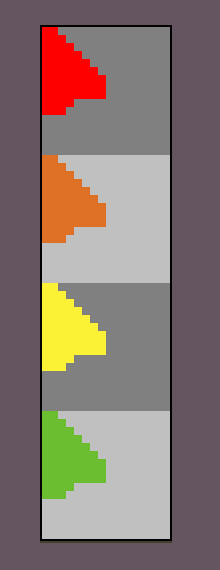
default.pngNext we add the following cursor settings. Note the line numbers.
json
{
	"animation": {
		"mode": "loop",
		"frametime": 2,
		"frames": [
			3,
			{ "index": 1, "time": 4 },
			0
		]
	}
}With these settings, our animated texture will play in this order:
- Green for 2 ticks.
- line #6 specifies frame
3(or green) as the first frame to play. - line #4 specifies the frame duration as 2 ticks.
- line #6 specifies frame
- Orange for 4 ticks.
- line #7 specifies frame
1(or orange) as the next frame and should play for 4 ticks instead of 2 from line #4.
- line #7 specifies frame
- Red for 2 ticks.
- line #8 specifies frame
0(or red) as the last frame - line #4 specifies the frame duration as 2 ticks.
- line #8 specifies frame
- Repeat.
- line #3 specifies the animation mode as "loop"
- Yellow is never played since it's not included in
frames.
Most of the animation settings are optional, so lets remove everything but the frametime:
json
{
	"animation": {
		"frametime": 2
	}
}Now the animated texture will loop and play all frames in the natural order in 2 ticks per frame.
- Red for 2 ticks.
- Orange for 2 ticks.
- Yellow for 2 ticks.
- Green for 2 ticks.
- Repeat
- "loop" is the default animation mode.
Practical Examples
For more examples, you can take a look at the built-in textures in the source files.
You may also view the community-made resource packs here.